Why is DLS 26 not working on my phone? That’s the question that can ruin your gaming mood when you’re ready to play Dream League Soccer 2026, but the game refuses to launch, freezes during loading, or crashes just before a match.
Mobile football games should be an easy escape, not a troubleshooting nightmare. Whether you’re using Android or iPhone, DLS 26 problems can result from outdated software, limited storage, unstable internet, corrupted game files, or device compatibility issues.
The good news is that many common problems can be fixed without replacing your phone. This guide explains nine practical solutions, how to identify the cause, and what to do when nothing seems to work. Follow Fluxio !!
Why Is DLS 26 Not Working on My Phone? Common Causes
Before changing random settings, identify exactly what happens when you launch Dream League Soccer 2026. The symptoms often reveal whether you’re dealing with a device problem, a network issue, or something related to the game itself.
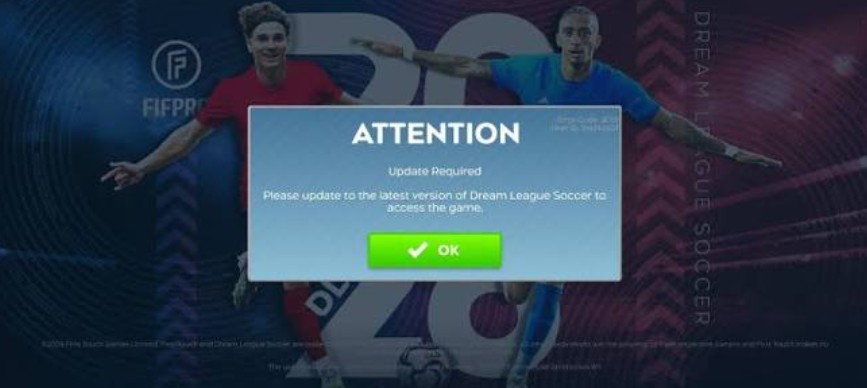
Here are the most common situations players encounter:
| Problem | Possible Cause | First Thing to Try |
| Game won’t open | Outdated app or software | Update the game |
| Crashes during startup | Memory pressure or damaged files | Restart the phone |
| Stuck on loading screen | Connection or server issue | Test another network |
| Black screen | Rendering or compatibility problem | Restart and update |
| Lag during matches | Heat or performance limitations | Lower graphics settings |
| Connection error | Unstable internet or service disruption | Check connectivity |
| Installation fails | Insufficient storage or incompatibility | Free storage |
| Closes after an update | App bug or installation problem | Check for another update |
A useful distinction is whether the problem occurs before or after reaching the main menu. If DLS 26 crashes immediately, investigate app installation, compatibility, and available memory first.
If the game opens normally but cannot connect to online features, network conditions or server availability become more likely explanations.
Players should also pay attention to when the issue started. A problem appearing immediately after a game update may have a different cause from one that develops gradually as the phone runs out of storage.
Don’t assume that every crash means your phone is too old. Even powerful devices can encounter software bugs, corrupted files, or temporary connection problems.
Understanding the symptoms is the fastest way to choose a useful fix.
How to Fix DLS 26 Not Working on Android and iPhone
If you’re wondering why is dls 26 not working on my phone, start with the simplest solutions before considering reinstalling the game. These nine fixes address common software, storage, connectivity, and performance problems.
- Restart your phone. A restart clears temporary memory pressure and can resolve minor software conflicts. Wait about 30 seconds before reopening DLS 26.
- Update Dream League Soccer 2026. Open Google Play or the App Store and check for an available update. New releases may address known bugs.
- Check available storage. Aim to keep approximately 3–5 GB free as a practical troubleshooting buffer, not an official game requirement.
- Clear the game cache on Android. Navigate to Settings, Apps, Dream League Soccer, Storage, and Clear Cache. Avoid Clear Data unless your progress is safely backed up.
- Update your operating system. Install compatible Android or iOS updates, then restart your device.
- Test another internet connection. Switch between Wi-Fi and mobile data to identify network-specific problems.
- Close unnecessary background apps. This may free memory and reduce competition for processing resources.
- Reduce graphics quality. If the game launches but performs poorly, try lower graphics settings and a reduced frame-rate target.
- Reinstall only as a last resort. First verify that your game progress is linked to a supported account or recovery method.
Test the game after each change. This helps identify the actual solution instead of making several adjustments without knowing which one worked.
DLS 26 Not Compatible With Your Phone? Check These Requirements
Sometimes the answer to why is dls 26 not working on my phone involves device compatibility rather than a temporary software problem.
Dream League Soccer 2026 is listed on Apple’s App Store with a minimum requirement of iOS 15.0 or later for supported iPhones. The listing also specifies iPadOS 15.0 or later for iPads.
For Android devices, compatibility depends on the version distributed through Google Play and the device’s supported hardware and software configuration. Rather than relying on an unverified universal RAM requirement, check the game’s compatibility notice directly in Google Play.
Even when installation is permitted, performance can vary considerably between devices.
A phone with 4 GB of RAM may behave differently from one with 8 GB, but memory capacity alone doesn’t determine whether DLS 26 will run smoothly. Processor performance, graphics drivers, thermal management, and software optimization also matter.
For example, a newer smartphone isn’t automatically guaranteed to outperform an older model in every game. Different graphics drivers and game-specific optimization can produce unexpected results.
If DLS 26 doesn’t appear in your app store or displays a compatibility warning, avoid forcing installation through unknown APK websites.
Also remember that installing the game successfully doesn’t guarantee consistently smooth gameplay. Compatibility and performance are related but separate issues.
Checking your device model, operating system version, and official app listing can help determine whether further troubleshooting is worthwhile.
>>> Read: How to Find Passwords on iPhone iOS 18: View Saved Logins, Wi-Fi Passwords & Passkeys
Why Does DLS 26 Keep Crashing or Freezing During Matches?
One particularly frustrating situation is when Dream League Soccer 2026 launches normally but suddenly freezes during a match. You might be preparing a shot, defending a counterattack, or entering the second half when the game becomes unresponsive.
If you’re asking why is dls 26 not working on my phone during actual gameplay, performance limitations deserve attention.
Overheating is one possible explanation. Smartphones may reduce processor and graphics performance when internal temperatures rise. This behavior, known as thermal throttling, can cause frame-rate drops or stuttering.
Memory pressure can also contribute to instability. Switching repeatedly between games, browsers, messaging applications, and video apps may leave fewer resources available for gameplay.
Graphics settings are another factor. Higher visual quality can place additional demands on the phone’s GPU, particularly during detailed stadium scenes and animated gameplay sequences.
Try these practical adjustments:
- Reduce graphics quality by one level.
- Choose a lower frame-rate option if available.
- Avoid playing while the phone is unusually hot.
- Close demanding background applications.
- Disable unnecessary screen recording.
- Allow the device to cool before restarting a match.
For reference, a stable 30 FPS experience can feel better than an unstable 60 FPS target that repeatedly drops frames.
However, these numbers are performance examples, not confirmed benchmarks for DLS 26.
If crashes started immediately after a particular update, report the issue to First Touch Games with your device model and software version. The problem may require a developer-side fix rather than another phone setting.
DLS 26 Stuck on Loading Screen or Showing Connection Errors
If you’re still searching why is dls 26 not working on my phone because the loading screen never disappears, internet connectivity should be one of your first checks.
Dream League Soccer requires an internet connection for most game modes. First Touch Games also explains that stable connectivity is particularly important for multiplayer matches, although exhibition matches can be available without an active connection.
Start by opening a website or another online application. If those services also fail, your connection is the likely problem.
Next, switch between Wi-Fi and mobile data. This simple test can help distinguish a local router issue from a broader service problem.
For online matches, download speed isn’t the only important factor. Network latency and packet loss can have a significant effect on multiplayer reliability.
First Touch Games estimates that a multiplayer match may use approximately 2 MB of data, although actual usage varies. Its support guidance also emphasizes that high latency and packet loss can disrupt matches even when bandwidth appears sufficient.
If your internet works normally but DLS 26 still cannot connect, consider a temporary game-service disruption.
Avoid immediately deleting the application. Server-side problems cannot be repaired by reinstalling software on your phone.
Instead, check official game announcements, confirm that you’re using the latest version, and try connecting again later.
When reporting the issue, include the exact error message and whether it occurs on Wi-Fi, mobile data, or both.
Frequently Asked Questions About DLS 26 Not Working
Why is DLS 26 not opening after an update?
A new update may introduce compatibility problems, require additional resources, or conflict with existing temporary files. Restart your phone, check for another update, and clear the Android app cache if appropriate.
Can I play DLS 26 with 2 GB RAM?
There isn’t enough verified information here to guarantee compatibility or smooth performance on every 2 GB device. Check Google Play for your specific phone and expect performance to depend on more than RAM alone.
Why does DLS 26 show a black screen?
A black screen may indicate a rendering issue, application failure, or software incompatibility. Restarting, updating, and checking device compatibility are reasonable first steps.
Will reinstalling DLS 26 delete my team?
It may put your progress at risk if your account isn’t properly linked or recoverable. Confirm your account recovery method before uninstalling.
Is DLS 26 down right now?
A loading or connection error doesn’t prove that the game’s servers are down. Check official announcements and test your connection before concluding that a service outage is responsible.
How can I make DLS 26 run smoother?
Lower graphics settings, close demanding background applications, maintain sufficient storage, and avoid extended gaming sessions when the device is overheating.
These answers cover the most common situations, but the correct solution ultimately depends on your device, software version, and the specific error you’re experiencing.
Conclusion
So, why is dls 26 not working on my phone? The most likely explanations include outdated software, insufficient storage, memory pressure, unstable internet, compatibility limitations, or temporary game-related problems.
The best troubleshooting strategy is to begin with low-risk fixes: restart your device, update the game, check connectivity, and reduce demanding graphics settings. On Android, clearing the app cache may also help.
If the game still refuses to launch, verify compatibility and contact official support before reinstalling or deleting any game data.
Remember that a powerful smartphone doesn’t guarantee perfect optimization, and not every DLS 26 error originates from your device.
The goal isn’t just to make Dream League Soccer 2026 open again—it’s to restore stable gameplay without risking your team, account progress, or personal data.
>>> Read: How to Update iPhone X to iOS 18: What Actually Works in 2026?
Keywords: DLS 26 not opening, Dream League Soccer 2026 crashing, DLS 26 stuck on loading screen, DLS 26 black screen, DLS 26 not compatible, DLS 26 Android problems, DLS 26 iOS issues, DLS 26 connection error, DLS 26 lag fix.

Pingback: How to Update DLS 2026 on Android? - Fluxio – Explore the Future of Technology