
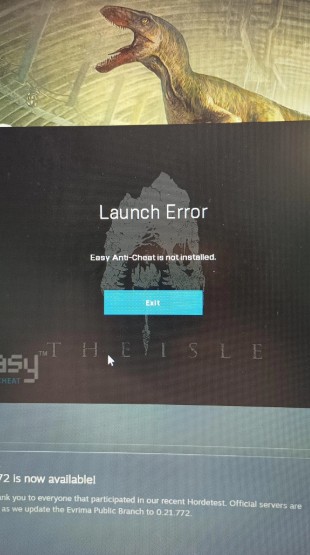
The the isle evrima anti cheat not installed error can turn an ordinary gaming session into a frustrating troubleshooting marathon. You launch The Isle, expect to enter Evrima, and suddenly encounter an anti-cheat warning instead of the dinosaur survival experience you were looking forward to.
The good news is that this message does not automatically mean your game installation is permanently damaged.
In many cases, the problem involves Easy Anti-Cheat (EAC), missing installation files, incorrect launch settings, or interference from Windows security software.
This guide explains how to diagnose the issue, repair the anti-cheat installation, verify Steam files, and avoid common mistakes that can make the problem worse. Follow https://gamefluxio.com/ !!!
Why Does The Isle Evrima Say Anti Cheat Not Installed?
The first step toward fixing the isle evrima anti cheat not installed is understanding what the error actually means.
The Isle uses Easy Anti-Cheat to help protect multiplayer sessions from unauthorized software and unfair gameplay modifications.
When the game cannot locate or initialize the required anti-cheat components, it may display an installation-related warning.
However, that warning does not always indicate that every anti-cheat file is missing.

Several situations can trigger similar errors.
An interrupted game update may leave the installation incomplete. Switching between game branches can also create inconsistencies if required files are not updated correctly.
Windows security settings or antivirus software may block a necessary executable.
In other situations, the game may be launched through an incorrect shortcut that bypasses the expected startup process.
A damaged Easy Anti-Cheat installation is another possible cause.
Players should distinguish between three general problems:
- Installation error: The required anti-cheat component is missing or not registered correctly.
- Initialization error: The component exists but fails to start.
- Connection or authentication error: Anti-cheat initialization succeeds, but another stage of verification fails.
These problems may produce different messages and require different solutions.
The most effective approach is to begin with reversible troubleshooting steps before deleting files or reinstalling Windows components.
For most players, Steam file verification is the safest place to start.
Verify The Isle Evrima Files Through Steam
When the isle evrima anti cheat not installed message appears, verifying your Steam installation is one of the safest troubleshooting methods.
Steam includes a built-in verification feature that compares installed files with the expected game installation and downloads replacements when necessary.
This is especially useful after switching from Legacy to Evrima or experiencing an interrupted update.
Follow these steps:
- Open Steam and navigate to your Library.
- Right-click The Isle and select Properties.
- Open the Installed Files section.
- Select Verify integrity of game files.
- Wait until Steam finishes checking the installation.
- Restart Steam and launch Evrima normally.
The process may take approximately 5–15 minutes, depending on your storage device, installation size, and whether files need downloading. This is an estimate, not a guaranteed completion time.
Steam verification can restore missing anti-cheat installation files, but it does not always repair the EAC service itself.
If the game still reports that anti-cheat is missing, continue with the dedicated repair procedure.
Also check Properties → Betas to confirm that the selected branch matches the version you intend to play.
Switching branches can require substantial downloads, so avoid repeatedly changing versions while troubleshooting.
Community troubleshooting resources for Evrima recommend file verification before more disruptive repairs.
>>> How to Use Night Vision in The Isle Evrima: Controls, Settings
Reinstall or Repair Easy Anti-Cheat Manually

If Steam verification does not resolve the isle evrima anti cheat not installed error, the next step is repairing Easy Anti-Cheat using files already included with the game.
Start by opening Steam, right-clicking The Isle, and selecting Manage → Browse local files.
Look for an installation script named InstallAntiCheat.bat. Windows may hide the .bat extension, so the displayed filename could simply be InstallAntiCheat.
If the script exists, run it and approve any legitimate Windows permission request.
Next, launch the game through Steam to test whether the repair succeeded.
If that method fails, open the EasyAntiCheat folder and look for an installer such as EasyAntiCheat_EOS_Setup.exe or EasyAntiCheat_Setup.exe.
The exact filename depends on the installed build.
A traditional setup program may offer an Install or Repair option. Some EOS installers operate silently, meaning no visible window appears.
Do not assume that a briefly appearing window proves the repair failed.
Another community-recommended recovery method is to rename the game’s EasyAntiCheat folder, then verify the game files again through Steam.
This allows Steam to restore the expected folder contents.
Only rename the folder inside the correct The Isle installation directory, and avoid modifying Windows system directories.
Community reports document both the installation script and folder-restoration methods, although neither is guaranteed to work on every computer.
Check Windows Security, Permissions, and Conflicting Software
Sometimes the isle evrima anti cheat not installed warning continues even after the relevant files have been restored.
In that situation, Windows security restrictions or software conflicts deserve attention.
Begin with Windows Security.
Open Virus & threat protection → Protection history and check whether a legitimate Easy Anti-Cheat component has been quarantined.
If a file was blocked, verify its original location and digital publisher before restoring it.
Avoid disabling antivirus protection permanently.
A narrowly scoped exception for a verified game component is safer than excluding an entire drive.
Windows permissions can also interfere with installation.
If an official anti-cheat setup program requires administrator access, approve the elevation request when you recognize the file and its source.
However, running the entire game as administrator should not be your default solution.
Background applications are another possible source of conflicts.
Overlay software, monitoring utilities, debugging tools, or outdated drivers can sometimes interfere with protected game processes.
Close unnecessary applications temporarily and test the game again.
Keep Windows and your graphics drivers updated through official sources.
If the error specifically identifies a loaded driver whose file is missing, that is a different problem from a simple installation failure.
A full Windows restart should be attempted first, followed by investigation of the named driver.
Do not delete system drivers or change BIOS storage settings casually.
The safest troubleshooting approach is to change one variable at a time, then test whether Evrima launches successfully.
Advanced Fixes When Easy Anti-Cheat Still Will Not Install
If the isle evrima anti cheat not installed problem survives the basic repairs, the next step is determining whether the failure involves the installer, Steam, or Windows.
Start with a complete restart rather than repeatedly launching the game.
Then return to the game’s installation directory and confirm that the expected Easy Anti-Cheat files exist.
If EasyAntiCheat_EOS_Setup.exe is present but does not display a window, that behavior may be normal for the EOS installer.
Some support documentation describes a silent installation method using a shortcut with the following target structure:
“EasyAntiCheat_EOS_Setup.exe” install prod-fn
However, installation arguments and product identifiers can vary between games and EAC configurations. Do not assume that an argument documented for another game is automatically correct for your installation.
Prefer The Isle’s bundled installation script or game-specific instructions.
If the installer is missing entirely, use Steam verification rather than downloading replacement executables from unofficial websites.
You can also check whether Windows has pending updates that require a restart.
As a final option, reinstall The Isle through Steam after backing up any locally stored settings you want to preserve.
Reinstallation can involve a substantial download and does not guarantee that a Windows-level service problem will disappear.
If the issue remains, collect the exact error message, Windows version, and relevant EAC logs before requesting technical support.
Those details are more useful than repeatedly reinstalling without identifying the cause.
Frequently Asked Questions and How to Prevent Future Errors
Why does The Isle Evrima say Easy Anti-Cheat is not installed?
The game may be unable to locate or initialize the required anti-cheat service. Missing files, damaged installation components, security restrictions, or incorrect launch settings are possible causes.
What is the fastest way to fix the isle evrima anti cheat not installed error?
Verify the game files through Steam, then run the bundled InstallAntiCheat script if the problem remains. Restart Windows and launch the game through Steam.
Can I play Evrima without Easy Anti-Cheat?
You should not attempt to bypass required anti-cheat protection. Protected multiplayer sessions depend on the game’s supported security components.
Does reinstalling The Isle always fix the problem?
No. Reinstallation may replace damaged game files, but a blocked service or conflicting driver can remain.
Is The Isle Evrima available on Android or iOS?
The Isle is a PC game distributed through Steam. Unofficial mobile APKs claiming to offer the complete Evrima experience should be treated cautiously.
To reduce future problems, allow Steam updates to finish, avoid interrupting installation processes, and use official software sources.
If you switch between Legacy and Evrima, verify that the correct branch has finished downloading before launching.
Final Verdict
The the isle evrima anti cheat not installed error is frustrating, but it often has a manageable cause.
Start with Steam verification, repair Easy Anti-Cheat using the bundled files, and investigate Windows security or driver conflicts only when necessary.
Avoid unofficial installers and unnecessary system changes.
A careful troubleshooting sequence gives you the best chance of returning to Evrima without creating additional problems.
>>> Read More: How to Entomb The Isle Evrima: Complete Survival and Burial Mechanics Guide (2026)

Pingback: The Isle Evrima Carnotaurus Guide 2026: Speed, Charge, Growth & Survival Tips - Fluxio – Explore the Future of Technology